


 Sign In
What are As-Built Drawings & How to Create Them
The best-laid construction management plans can quickly go sideways. While teams spend countless hours planning the perfect build, unexpected on-site challenges often force builders to make adjustments on the fly. Accurate as-built drawings ensure those changes are clearly documented, making facility maintenance, management, and future renovations easier down the line—especially when projects completed 10–15 years ago in AutoCAD no longer have accessible digital files. When the original drawings are missing, outdated, or trapped in old systems, capturing current conditions becomes the fastest way to rebuild a reliable baseline and keep renovation and modification milestones on time and on budget.
Unfortunately, as-built drawings aren’t always given the treatment they deserve in construction management. Issues like poor documentation practices, manual site surveys, and a lack of collaboration result in incomplete or outdated as-built drawings.
In this article, we’ll break down what an as-built drawing is, why they’re beneficial, and how to overcome common challenges. Along the way, we’ll highlight how forward-thinking companies are using digital twin technology to create and maintain as-builts more effectively, and how you can do the same.
What are as-built drawings?
As-built drawings are final plans that document a building after construction. They serve as the official record of how and why the real building differs from the original plans. As-built drawings are compiled during project closeout and are reviewed alongside inspections before handover or occupancy.
As-built drawings are part of broader as-built documentation, which also includes:
Change logs that document what was modified during construction and why
Existing conditions drawings that capture a site or building before work begins
Record drawings, which are the final, approved version of the as-built drawings
Shop and fabrication drawings to document how specific components are manufactured and installed
One of the main inputs used to create as-built drawings is redline drawings. Unlike as-built drawings that are final, redline drawings are temporary. They are markups made by builders as they make adjustments during construction. Redline drawings are how contractors document what was actually built and why the changes occurred.
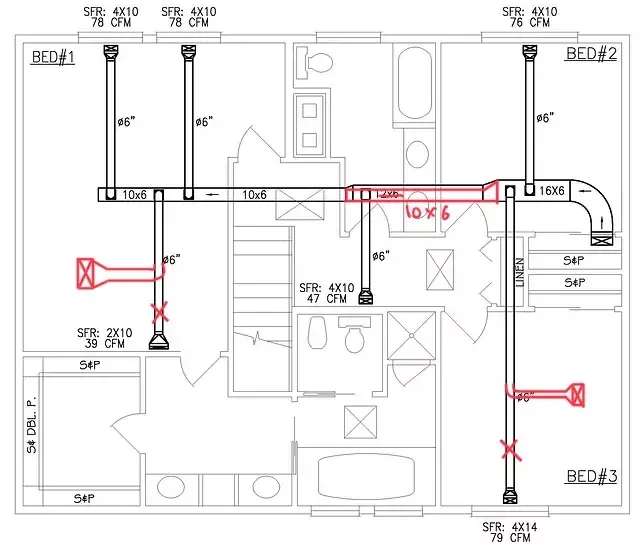
An example of a redline showing how a ductwork system had to undergo some modifications during building. (Source)
6 things to include in every as-built drawing
Finalized as-built drawings include these key components:
Original plans and designs: Original specs give a comparison point between as-built vs. original plans.
Modification notes: Changes from the construction phase streamline future projects. Be explicit in notes and descriptions so future contributors know exactly what was swapped out or changed.
As-built dimensions: Exact measurements are needed for renovations, maintenance, and record-keeping.
Material specs: Materials used in the building project need to be clearly documented. Include the type of material, manufacturer, and compliance documents.
Photographs: Photos of the completed project give instant visual context.
As-built survey: A survey conducted by contractors or architects documents utility locations, surface heights, dimensions, and any changes from the original plans.
As-built drawings consolidate the information from individual contributors into one, clear resource.
Who is responsible for as-built drawings?
The person responsible for as-built drawings is an architect or engineer. They rely on construction documentation from contractors and builders, as well as verified data of on-site conditions.
As-built drawings support different teams in different ways across a building’s lifecycle:
Surveyors / Survey technicians: Capture and verify existing conditions in the field, ensuring measurements and site geometry reflect reality before design work begins.
Drafters / Draftsmen: Convert field notes, scans, and markups into clean as-built drawings that teams can actually use for planning and permitting.
Architects: Review existing conditions before planning renovations or expansions.
Designers: Check layouts and dimensions before planning remodels or interior updates.
Contractors: See how systems were installed to better plan work, and order the right materials
Building owners/managers: Streamlined maintenance, budgeting, compliance, and due diligence.
While as-built drawings can deliver numerous role-specific benefits, they also play a larger role across construction.
The importance of as-built drawings
Few places are as busy as a construction site, especially on large projects with rotating teams and multiple stakeholders. As-built drawings provide continuity across the building lifecycle long after construction is complete.
Effective portfolio management and maintenance
Consistent documentation across a portfolio is the cornerstone of good management. As-built drawings are an official, accurate, and detailed record of a project from planning, to construction, to ongoing operation. This makes it easier to pass compliance audits, track sustainability goals, and optimize usage.
Reliable maintenance and repair work references
Accurate records help facility management teams rapidly diagnose and resolve maintenance issues. Say there’s a maintenance issue related to supply grilles. The original design drawings show the grilles in one room, but during construction, they were moved. As-built drawings show the final location so teams can access the system without wasting time.
Efficient renovation planning and execution
Much like maintenance, renovations rely on up-to-date information of the current building. As-built drawings show which materials were used and where load-bearing supports are located. This helps teams plan renovations with fewer surprises and less rework.
Clear modification evidence for stakeholders
After construction, downstream stakeholders like owners, facilities teams, and inspectors need as-builts to understand what changed. This clarity reduces friction after construction and supports inspections, operations, and long-term management.
Seamless communication and collaboration
Clear documentation helps decisions carry forward as teams change. As-builts help new crews and remote teams understand what was actually built, even if they were not present when changes occurred. By keeping as-built drawings accessible and up to date, collaboration naturally improves.
Mitigation of inaccuracy risks
Outdated drawings introduce risk. Using as-built drawings, teams have a reliable reference so work can be planned and executed with no surprises. Accurate drawings speed up maintenance, simplify renovations, and reduce the chance of mistakes.
Thorough compliance documentation
Projects are expected to demonstrate compliance after construction is complete. When as-builts are submitted alongside inspections and sign-offs, they verify that the completed project aligns with applicable codes and requirements.
Solving common as-built drawing challenges
As-built drawings help with projects, but only if they are fully completed. Overcome the following challenges to set your construction project up for success.
Incomplete or missing documentation
Incomplete as-built drawings create gaps that surface later during maintenance, renovations, or audits. Missing measurements or unclear system layouts can lead to delays, rework, and unexpected costs. In regulated environments, incomplete documentation can also complicate compliance reviews and sustainability reporting.
Solution: Capture comprehensive data with reality capture tools like Matterport to ensure full documentation, including floor plans, dimensions, and visual context. Attach files and notes directly to a highly accurate 3D model of the building. This creates a complete record of existing conditions with visual context tied to real locations.
With more complete documentation, teams can respond faster to audits, avoid delays during maintenance, and make better-informed renovation decisions.
Lack of coordination or hard-to-navigate records
Even when documentation exists, it is often hard to use. Paper files may be stored in different offices, while digital files are uploaded without structure or ongoing updates. As a result, teams waste time searching for information or relying on vague notes like “replaced with similar valve,” which lack the detail needed to act.
Solution: Centralize your records using a cloud-based platform. With every aspect of your building uploaded to an interactive digital twin:
Drawings, visual context, and spatial data live together
Tagged locations and comments make collaboration simple
Site measurements, notes, and files are easy to find
Changes are captured with a time-stamped history
Files and walkthroughs can be shared easily across tools and teams
When records are centralized and easy to navigate, teams spend less time searching for information and more time taking action.
Outdated technology
Traditional as-builts are static and rarely updated. Manual measurements, physical documents, and disconnected digital tools often mean drawings are outdated and don’t reflect a building’s current state.
Solution: Modern reality capture tools make updates easier to maintain, and teams can take photos or scans of real site conditions. Then, they link these images to spaces in 3D so they can document changes as they occur and update records after important milestones.
If you’re interested in seeing how easy it is to document once and share everywhere, watch our webinar below:
Using modern technology brings efficiency to every role in construction. Digital twins ensure that as-builts are always updated when changes are made to buildings.
How to create as-built drawings with Matterport
Creating as-built drawings with Matterport is easy. First, scan your finished building to make a digital twin. Next, export the plans in your chosen format. Finally, gather all your notes and data on any changes.
Here’s a simple guide on how AEC professionals make accurate as-built drawings with digital twins:
Capture the site using a Matterport Pro3 camera. The Pro3 uses LiDAR, taking millions of measurements in conditions from dim light to direct sunlight. These scans are compiled into a digital twin (a 3D model) of your site. It’s accurate to-the-millimeter.
Once your digital twin is completed, order floorplans by going into the Matterport Portal. You can choose a MatterPak™ (OBJ, point cloud, E57, and reflected ceiling plans) or Schematic Floor Plans (BIM, CAD, DWG).
Import your Matterport plans into design software like Autodesk Revit or AutoCAD and trace over the differences. Add notes from redline drawings and relevant details given to you by the contractors
Export the final CAD/BIM as-built drawing set, including floor plans, elevations, and sections. Upload these to your Matterport platform so you can keep documentation centralized and easy to access.
Many teams adopt digital twins to support major renovation projects. When Stantec began work on a 2,000-square-foot renovation of an aging medical building with a long history of modifications, traditional survey methods would have required multiple site visits and several days of manual measuring and documentation.
By using Matterport for site surveys instead, Stantec was able to:
Reduce time spent documenting existing conditions by 60–70%
Verify dimensions and system locations without returning to the building
Improve model accuracy by aligning Revit to real-world scan data
Resolve questions with engineers and stakeholders using the 3D model
Teams also enjoy great ROI by using Matterport across the whole construction process. Nordlaks COO, Tomas Tømmerås, implemented Matterport digital twins to support coordination across a large and complex site with 2,500 kilometer supply lines. By scanning existing conditions early, the team created accurate 3D models of the infrastructure, aligned stakeholders through remote collaboration and inspections, and reduced site visits.,
“Everything becomes accessible and works so easily. I am no longer tied to my own PC to get exactly the views or documents that I need." - Tomas Tømmerås, COO at Nordlaks
Digital twins are especially helpful in ongoing facility management. When CERN, the European Organization for Nuclear Research, performed major upgrades for complex underground facilities, they integrated Matterport to improve infrastructure management. Now their teams can perform inspections remotely, more easily collaborate, and reduce the potential radiation exposure of personnel.
As-built drawings can benefit your team, no matter their role, in a number of ways. Find out more about how Matterport supports AEC firms from scan to build—and see how digital twins are driving construction innovation.